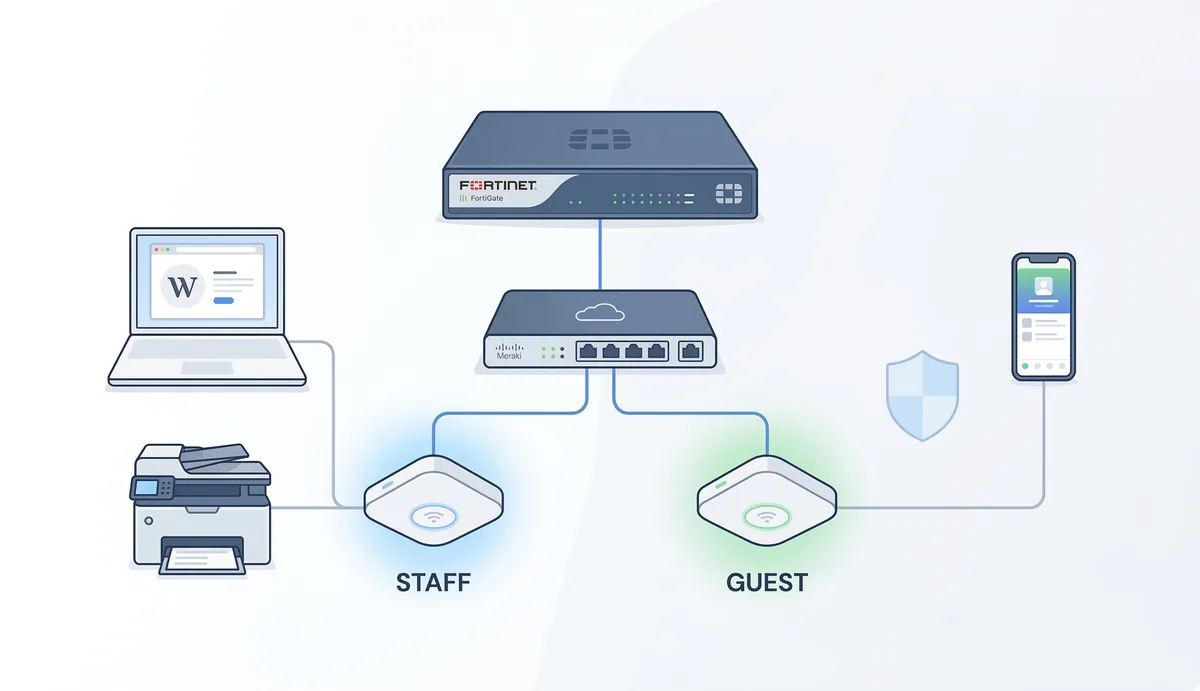
TL;DR: I deployed a segmented network with FortiGate + Meraki for a remote office. The ISP hadn’t finished provisioning the circuit, VLANs didn’t exist where they needed to, and a WiFi printer uncovered a hidden firewall rule. Everything got resolved, but not before losing hours on problems that weren’t mine.
The Project
Network for a small/medium remote office. Clear requirements: secure internet, corporate WiFi separated from guest, cloud management, and operational simplicity.
Stack:
- Firewall: Fortinet FortiGate 60F (gateway, NAT, DHCP, policies)
- Switch: Cisco Meraki MS130-24P (PoE, VLAN trunking, cloud managed)
- Access Points: Cisco Meraki MR46 (cloud managed, automatic roaming)
Topology:
ISP → FortiGate 60F → Meraki MS130-24P → MR46 APs + wired devicesThe firewall does all the heavy lifting: routing, NAT, DHCP, and policy enforcement. The switch distributes VLANs and powers the APs via PoE.
Segmentation
Two VLANs, two worlds:
| VLAN | Purpose | Subnet | Access |
|---|---|---|---|
| 10 | Staff WiFi | 192.168.10.0/24 | Full LAN + internet |
| 30 | Guest WiFi | 192.168.30.0/24 | Internet only, no LAN |
Each VLAN with its own gateway and DHCP on the FortiGate, separate firewall policies. Guest can’t touch anything internal - exactly as it should be.
The Real Problems
1. The ISP that wasn’t ready
The physical link was active. Green light on the port. But the gateway wasn’t responding - ICMP returned “Destination unreachable”.
I spent a good while checking WAN config, default route, NAT… everything was correct on my side.
Root cause: the ISP hadn’t finished provisioning their router. The circuit was physically delivered but not logically. One call to the ISP and 30 minutes later, everything worked.
Lesson: before touching your config, verify the other side is ready. A ping to the ISP gateway before configuring anything else saves you hours.
2. Homeless VLANs
WiFi clients were getting IPs via DHCP but had zero connectivity. No internet, no LAN, nothing.
Cause: the VLAN interfaces were missing on the FortiGate. The switch was distributing VLANs correctly, the APs were assigning SSIDs to the right VLANs, but the firewall had no interfaces to receive them.
No VLAN interface on the firewall = no gateway = no routing = no life.
Lesson: validate VLANs end-to-end. Just because they exist on the switch doesn’t mean they exist where it matters.
3. The ghost printer
The WiFi printer had the correct IP on the staff VLAN. Users couldn’t ping it. Looked like a Layer 3 problem.
But when testing IPv6, the printer responded perfectly via link-local. That confirmed Layer 2 was working - the problem was IPv4-specific.
Cause: Meraki had a default rule on the SSID: Deny IPv4 Any Local LAN Any. It was blocking all IPv4 traffic between devices on the same VLAN at the AP level, before it even reached the switch.
Lesson: check the default rules on your WiFi platform. And IPv6 can be your best troubleshooting tool - if IPv6 works and IPv4 doesn’t, the problem isn’t physical connectivity.
What I Learned
Verify the ISP first. Before diagnosing your side, confirm the circuit is provisioned end-to-end. A ping to the ISP gateway is step zero.
VLANs are a system, not a component. They need to exist on the switch, on the APs, AND on the firewall. If one link in the chain is missing, nothing works.
Cloud platforms have opinions. Meraki, Fortinet, any managed platform comes with default rules that can block legitimate traffic. Don’t assume “default” means “permissive”. Once your network is running, securing access with SSO and Zero Trust becomes the next layer.
IPv6 is useful even if you don’t use it. Link-local is always there and can confirm Layer 2 is working when IPv4 is lying to you.
Document everything. Not for the report - for yourself in 6 months when something stops working and you need to remember why it was configured that way. And once your mail is flowing through the network, protecting it with MTA-STS prevents downgrade attacks.
By: Cesar Rosa Polanco - Based on a real case, with editorial support from artificial intelligence.