TL;DR: I spent $83 on Claude API calls in a single day. My normal usage is $3-5. This is the story of what happened, why it happened, and how I fixed it.
The Rude Awakening
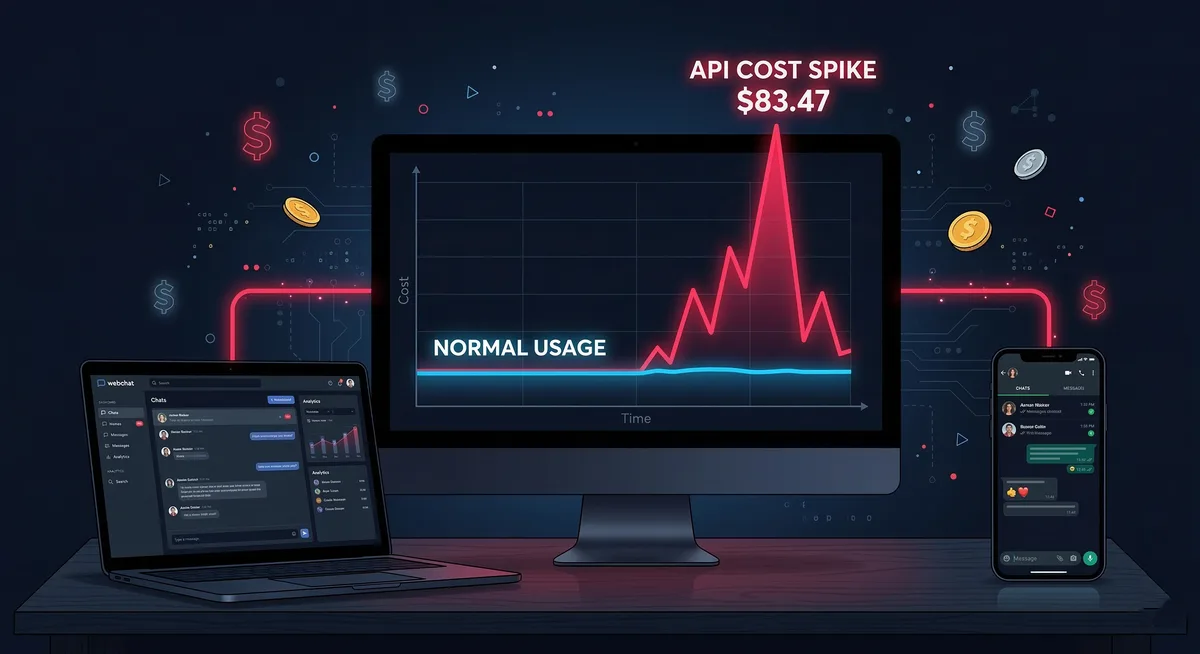
It was a normal morning. Coffee in hand, I check the Anthropic dashboard to see the previous day’s API usage. I expected the usual $3-5.
$83.47
I thought it was an error. Refreshed the page. Still there. A massive spike on the graph, like Pico Duarte - the highest peak in the Dominican Republic (pronounced “PEE-koh DWAR-teh”) - rising above the usual rolling hills.
70 million tokens processed in 24 hours. My normal day is 3-5 million. This was 14 times more.
The Context (literally)
I run OpenClaw with Claude Sonnet 4.5 as my personal AI assistant. It handles my emails, processes invoices, writes articles for this blog, monitors my stock watchlist, and basically acts as my second brain. (For the technical details of how this is set up, see the implementation guide.)
It’s connected through two channels:
- WhatsApp (mobile, always with me)
- Webchat (desktop, when I’m working)
Both share the same session: agent:main:main. That means the entire conversation history gets loaded every time I send a message, regardless of channel.
And that’s where the trouble started.
The Autopsy
SSH into the server, dig through logs, do the math.
The Cold Numbers
March 9, 2026:
- 1,912 API calls to Claude
- Average context size: 130,000 tokens
- Peak context size: 157,000 tokens
- Session transcript size: 2.4 MB uncompressed
For the non-technical: imagine that every time you say something to your assistant, it has to re-read the ENTIRE conversation book from the beginning before answering. And that book is now 2.4 MB of text.
Culprit #1: Context Bloat
My session hadn’t been cleaned in days. Every message, every file read, every search - it all accumulated. The context had grown to 157k tokens - nearly 80% of Claude’s 200k limit.
Every message I sent, no matter how simple (“what time is it?”), loaded 157k tokens of history before processing my question.
Claude Sonnet 4.5 pricing:
- Input: $3.00 per million tokens
- Output: $15.00 per million tokens
- Cached input: $0.30 per million (90% cheaper)
Even with 94% cache hit rate, a 157k context gets expensive fast:
157k tokens × $0.30/1M (cached) = $0.047 per message just for context
1,912 messages × $0.047 = $89.86 in pure context input
Culprit #2: Channel Ping-Pong
I was using WhatsApp and Webchat at the same time without realizing the effect. WhatsApp messages in the morning, webchat at the office, alternating throughout the day. Each channel loading the same massive context.
The logs don’t lie:
Mar 09 10:26:38 - webchat session start
Mar 09 10:27:48 - whatsapp message
Mar 09 12:05:41 - webchat message
Mar 09 12:08:05 - whatsapp message
Mar 09 12:11:13 - whatsapp message
Mar 09 12:13:59 - webchat message
And the red flags were there: 5-10 second responses for simple messages, logs showing forceFlushByTranscriptSize=true, and warnings of tokenCount=157344 brushing against the limit. I wasn’t paying attention.
Why This Scales So Badly
Quick comparison:
Normal day (30k context):
100 messages × 30k tokens = 3M tokens input
With 94% caching ≈ $1.50
The disaster day (157k context):
120 messages × 157k tokens = 18.8M tokens input
With 94% caching ≈ $11 input + $72 output = $83
Context is a cost multiplier. Every token of history is paid for on every message you send.
How I Fixed It
Immediate Actions
1. Budget Alert - Anthropic Console → Settings → Billing → $15/day alert. No more surprise wake-up calls.
2. Cleared the Session
openclaw session:clear agent:main:mainContext back to ~0. Fresh session.
3. One Channel Rule - Only one channel active at a time. Desktop → webchat. Mobile → WhatsApp. Never both simultaneously.
4. Automatic Cleanup - Cron job every Sunday:
0 0 * * 0 openclaw session:clear agent:main:mainLong-Term Prevention
Context: Weekly monitoring, alert if >100k tokens, proactive cleanup.
Models: Heartbeats and simple tasks on Haiku ($0.25/1M vs $3/1M). Sonnet for what actually needs it.
Channels: Webchat as primary, WhatsApp only for mobile emergencies, testing on separate sessions. (The follow-up article covers voice integration, secrets management in 1Password, and real production costs: OpenClaw Part 2.)
Lessons
Context is King (and Villain)
The context window is your best friend and your worst enemy. It gives you continuity - the AI doesn’t start from scratch every time. But it grows unchecked if you don’t watch it, and every token gets charged on every message.
New rule: Context >100k = time to clean up.
Architecture Matters
Multiple interfaces sharing the same massive context = multiplied cost. The real long-term fix: separate sessions per channel, selective context sharing, rate limiting.
Monitoring is Not Optional
If you don’t measure, you can’t optimize. The most expensive part wasn’t the $83 - it was the time I didn’t know. If I’d configured alerts from day one, I would have caught it at 2 PM instead of 8 AM the next morning.
The Day After
Today, March 10, my usage is at $3.47. Normal. Context size: 36k tokens. Budget alert: configured.
Inefficiency can turn something cheap into something expensive very quickly. But $83 to learn AI cost architecture, complex systems debugging, and the importance of monitoring - that’s cheap tuition.
Would it happen again? Not if I can help it. But if it does, I know exactly what to look for and how to fix it.
And now so do you.
This article is part of my series documenting real experiences building with AI. No theory, just battles in the trenches.
By: Cesar Rosa Polanco - Based on a real case, with editorial support from artificial intelligence.